
List priceAED 80
National Distributor
Hikvision · Video Intercom
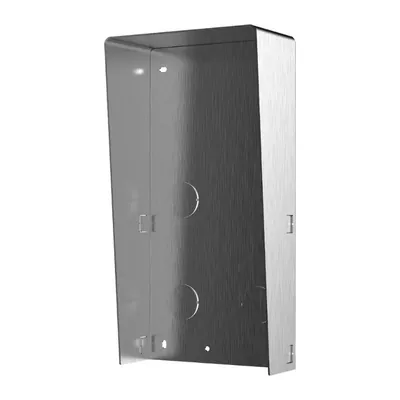
Hikvision DS-KABD8003-RS2 Rain Shield of Module Door Station
The Hikvision DS-KABD8003-RS2 is a Rain Shield of Module Door Station in Hikvision's Module Door Station Accessories. Convenient design available for the 2 module surface mounting of the modular door station (DS-KD8003-IME1 or DS-KD8003-IME2). ADS supplies it in the UAE: call for wholesale prices and availability.
List priceAED 67Including 5% VAT.Wholesale / project price: Call for price
Supplied in the UAE by the Hikvision National Distributor.
Overview
The Hikvision DS-KABD8003-RS2 is a Rain Shield of Module Door Station in Hikvision's Module Door Station Accessories. Convenient design available for the 2 module surface mounting of the modular door station (DS-KD8003-IME1 or DS-KD8003-IME2). ADS supplies it in the UAE: call for wholesale prices and availability.
The Hikvision DS-KABD8003-RS2 is part of our Accessories in Video Intercom range. ADS is the Hikvision National Distributor for the UAE and can supply it together with the recorder, switch and accessories you need for a complete system.
Key features
- Convenient design available for the 2 module surface mounting of the modular door station (DS-KD8003-IME1 or DS-KD8003-IME2)
- Material: SECC
Technical specifications
General
| Brand | Hikvision |
|---|---|
| Model | DS-KABD8003-RS2 |
| Working temperature | -40° C to +60° C (-40° F to 140° F) |
| Working humidity | 10% to 95% |
| Weight | 500g |
| Dimension (W × H × D) | 224x 116.4×58 mm (8.82" x 4.58" x 2.28") |
| Installation | 1. Paste the installation Sticker 1 onto the wall. Make sure the sticker is placed leveled via measuring with the gradienter. Chisel 4 holes with drill align to the screw holes on the sticker. The suggested size of hole is 6 (diameter) × 25 (depth) mm. 2. Remove the sticker and insert the expansion sleeves into the screw holes. Fix the mounting frame and protective shield onto the wall with 4 expansion bolts. Thread the module-connecting line across the thread hole of the frame. Pass the main unit connecting lines across the thread hole to the upper grid. Connect the cables and module-connecting line to the corresponding interfaces of the main unit, then place the main unit into the upper grid. Connect the other end of the module-connecting line to the input interface of the sub module. Organize the line with cable tie in the package. 3. Insert the modules in to the frame after wiring. Main unit must be placed in the top grid. 4. Use the hexagon wrench in the package fix the cover onto the frame. |
| Material | SECC |
Specifications can vary by region and firmware. Ask us to confirm details for your project.
How it fits into a system
- Door station
- PoE switch
- Indoor station
- Phone app
Questions about the DS-KABD8003-RS2
Where can I buy the Hikvision DS-KABD8003-RS2 in Dubai?
ADS, the Hikvision National Distributor for the UAE, supplies the DS-KABD8003-RS2. Visit us at Shop No.1, Al Thani Building, Al Raffa Street, Al Fahidi, Dubai, UAE (Mon–Sat 09:30–22:00), call +971 50 451 9226, or add it to your quote list.
What is the price of the Hikvision DS-KABD8003-RS2?
The list price of the DS-KABD8003-RS2 is AED 67 including 5% VAT. For wholesale and project prices call +971 50 451 9226, message us on WhatsApp, or add it to your quote list.
Buy the Hikvision DS-KABD8003-RS2 in Dubai, UAE
More Accessories
List priceAED 53
List priceAED 80
List priceAED 100