
List priceAED 6,134
National Distributor
Hikvision · Parking & Vehicle Access
Hikvision DS-TMT1A0 Parking Management System Software(PMS)
The Hikvision DS-TMT1A0 is a Parking Management System Software(PMS) in Hikvision's Parking Management Software. Simple barrier gate control via the I/O interfaces of the capture camera to control the vehicle entry and exit, supporting manual correction of license plate number. ADS supplies it in the UAE: call for price and availability.
PriceCall for pricePricing depends on quantity and project. We reply the same day we can.
Supplied in the UAE by the Hikvision National Distributor.
Overview
The Hikvision DS-TMT1A0 is a Parking Management System Software(PMS) in Hikvision's Parking Management Software. Simple barrier gate control via the I/O interfaces of the capture camera to control the vehicle entry and exit, supporting manual correction of license plate number. ADS supplies it in the UAE: call for price and availability.
The Hikvision DS-TMT1A0 is part of our Vehicle Access Control Management in Parking & Vehicle Access range. ADS is the Hikvision National Distributor for the UAE and can supply it together with the recorder, switch and accessories you need for a complete system.
Key features
- Simple barrier gate control via the I/O interfaces of the capture camera to control the vehicle entry and exit, supporting manual correction of license plate number.
- The whitelist vehicles can pass automatically, realizing the quick entry and exit with ANPR system.
- Supports multiple parking fee rules for temporary vehicles, such as payment by the total parking duration, payment by day and night, etc.
- License plate and vehicle picture storage in Industrial Personal Computer or PC.
- You can search and view the passing vehicle information, including license plate number, passing time, vehicle type, release mode, etc. via license plate number, card No., time, entrance and exit, etc.
- Blocklist/Whitelist management, and alarm notification (supports up to 100,000 license plate numbers)
- Special parking alarm, including list expiration check etc.
- Available parking lots statistics, supporting data output to Hikvision LED display.
- Supports data search and related data report, etc.
Technical specifications
General
| Brand | Hikvision |
|---|---|
| Model | DS-TMT1A0 |
Lane Access Capacity
| Lane Number | 4 lanes and 8 lanes optional |
|---|
Functions
| Vehicle Monitoring | You can view the real-time information of the entering and exiting vehicle, including the passing vehicle picture, license plate number, card No., etc., check the vehicle information, and realize fuzzy match. The entering and exiting vehicles can be distinguished, and you can view the unhandled, unreleased, and released vehicles. Supports barrier gate control (open/close/lock/unlock), manual picture capture in coil triggering mode, and open/close to limit status display. Live view of the entering and exiting lanes. Supports error information prompts, such as the vehicle and card No. mismatch, the vehicle has been expired, etc. Supports editing the number of parking spaces. |
|---|---|
| Registered Vehicle Management | Supports adding, editing, and deleting vehicles. Supports independent and continuous card dispensation. Supports the parking lot permissions of the registered vehicles. Supports importing the vehicle information in batch. Supports importing the vehicle information fully or partially. Supports importing and exporting of the vehicle group information. Displays the vehicle information, including the license plate number, validity, owner name, etc. Supports detecting the card to view the vehicle information. Supports editing the vehicle information after the card detection. Supports topping up, renewing, reissuing, and canceling cards of the registered vehicles. Supports searching the vehicle information according to different conditions, such as the license plate number, card No., etc. |
| Blocklist Management | Supports adding, editing, and deleting the arming information. Supports importing the arming information and exporting the arming information fully or partially. You can view the arming information, including the armed license plate number, validity, arming reason, etc. Supports reminding that the arming vehicles are entering via LED display. Supports searching the arming information according to different conditions, such as the license plate number, arming reason, arming status, etc. |
| Records Search | Supports searching the information of the normal passing vehicles according to the time, license plate number, entrance and exit, lane, and direction. Displays the detailed information. Supports exporting the vehicle passing data. Supports searching the information of the vehicles in the parking lot according to the time, license plate number, and entrance and exit. Displays the detailed information. Supports searching the payment information of the passing vehicles according to the time, license plate number, entrance and exit, operator, and card No. Displays the detailed information. Supports renew records according to the time, payment type, operator, license plate number, and card No. Displays the detailed information. |
| System Configuration | Supports enabling and setting the entrance and exit name and lane name, setting the lane type, vehicle control, entrance and exit type. Supports adding, editing, and deleting devices such as ANPR cameras, barrier displays, etc. Supports setting the end users and user roles, including the user name, role, enabling status, etc. Supports the permission settings of the end users. Supports basic settings, vehicle records settings, database settings, charging settings, etc. |
| Duty Shift Management | Supports the operator to be off duty. The payment and discount details can be calculated during the duty off, and the payment details can be printed. Supports the duty shift from one operator to another. During the shift, the payment and discount details can be calculated, and the payment details can be printed. |
| Payment Configuration | Supports adding, editing, and deleting the charging rules. Supports setting the payment rules according to the vehicle types. Supports adding, editing, and deleting the reduction rules. Supports adding, editing, and deleting the registered vehicle category which are set to pay according to the different charge rules of the parking lot for the registered vehicles. Supports adding, editing, and deleting the exceptional vehicle rules which are set to release the vehicle in exceptional conditions that the vehicle cannot exit. Supports adding, editing, and deleting the reduction rules to make it convenient to renew. |
| Data Statistics | Supports searching the traffic flow data and exporting the traffic flow pictures according to the day, month, year, parking type, vehicle type, entrance and exit, parking lot, license plate number, card No., etc. Supports searching the payment data and exporting the payment statistics pictures according to the day, month, year, operator, payment record, entrance and exit, parking lot, license plate number, card No., etc. Supports the statistics of registered vehicles/cards, prepaid vehicles/cards, temporary vehicles/cards, exceptional releasing, sum of vehicles, and sum of payment fees according to the day, month, year, and operator. Supports exporting the statistics result in excel or pdf. Supports the statistics of card cost, renewing payment, and renewing in group payment according to the day, month, year, and operator. Supports exporting the statistics result in excel or pdf. |
| Device Management | Supports connecting to the ANPR cameras. Supports synchronize blocklist and whitelist vehicles information. Supports barrier gate control. Supports connecting to the screens to display information, such as the entered vehicle license plate number, exited payment information, and the number of free parking spaces. Supports custom contents on the screen. Supports connecting to the card readers including the desktop card readers and UHF card readers. |
| Vehicle Passing and Charging | Supports releasing the registered vehicles according to the parking lot permissions. Supports releasing the vehicles which cannot be found the entry record manually. Supports fuzzy match to search the entered vehicles when the exited vehicles cannot be found the entry records. Supports license plate number verification. Supports the expiry notification in advance and after the expiry for the registered vehicles and LED display. Supports setting the charging rules by parking time period. |
| Others | Supports adding multi-camera filtering function for a lane, which can filter the vehicle passing record with the highest license plate confidence. Supports not to let the vehicle enter when there is no free parking space. Supports card filtering and license plate filtering. Card filtering supports filtering by the direction and filtering all, applicable to the card mode. License plate filtering is applicable to the mixed lanes. Supports backup database. Supports printing tickets for the payment. Supports up to 4/8 lanes. Supports admin user to log in with encrypted password and change the password. Supports setting the time period to allow the registered/temporary vehicles to enter, cooperated with the lane releasing rules. |
Product Compatibility List
| All-in-One Entrance & Exit Manager | DS-TMC407-E series DS-TMC403-EM/L series |
|---|---|
| ANPR Camera | DS-TCG405 series DS-TCG406 series DS-TMC403-EL series |
| UHF Controller | DS-TME200-D DS-TME200-D/P |
| UHF Card Issuer | DS-TRD902-1/A UHF |
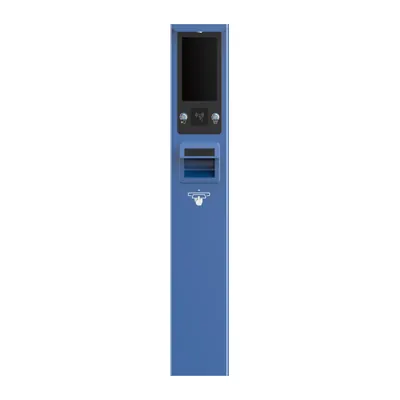
| Video-intercom Pole | DS-TMT1A0 |
| Card Enrollers | DS-K1F100-D8E |
| Entrance & Exit LED Screens | DS-TVL224 series |
Hardware Requirement
| Processor | Apollo Lake Platform Processor or better |
|---|---|
| Basic Frequency | 1.5 GHz or better |
| RAM | 4 GB or better |
| Database Requirement | PostgreSQL V11.21 |
| CPU Requirement | If lane preview needs to be enabled, hardware decoding must be supported. |
| Recommended Operating System | Microsoft® Windows 11 64-bit Microsoft® Windows 10 64-bit Microsoft® Windows Server 2025 Microsoft® Windows Server 2019 64-bit Microsoft® Windows Server 2016 64-bit Microsoft® Windows Server 2012 R2 64-bit Microsoft® Windows Server 2012 64-bit Microsoft® Windows Server 2022 Note: For Windows Server 2012 R2, make sure it is installed with the rollup (KB2919355) updated in April, 2014. |
Specifications can vary by region and firmware. Ask us to confirm details for your project.
Questions about the DS-TMT1A0
Where can I buy the Hikvision DS-TMT1A0 in Dubai?
ADS, the Hikvision National Distributor for the UAE, supplies the DS-TMT1A0. Visit us at Shop No.1, Al Thani Building, Al Raffa Street, Al Fahidi, Dubai, UAE (Mon–Sat 09:30–22:00), call +971 50 451 9226, or add it to your quote list.
What is the price of the Hikvision DS-TMT1A0?
The DS-TMT1A0 is listed as "Call for price" because the price depends on quantity and project. Call +971 50 451 9226, message us on WhatsApp, or add it to your quote list and we will reply with pricing.
More Vehicle Access Control Management
List priceAED 6,006
List priceAED 6,006
Call for price